Nonfiction, and PDFs, in Book2Life
Book2Life started as a way to see novels: the characters, the rooms, the weather. Point that machinery at The Wealth of Nations and it struggles. There's no cast to draw, the "scenes" are arguments, and the best thing in the chapter is often a number.
So nonfiction now gets its own treatment, and since a lot of nonfiction lives in PDFs, those import too.
It knows what kind of book it is
When you add a book, Book2Life works out whether it's fiction, nonfiction, or something in between, like a memoir or narrative history. Novels keep everything they had. Nonfiction drops the illustrations and gets the tools below. If it guesses wrong, change Book Type in Book Details.
Big ideas, with the sentence they came from
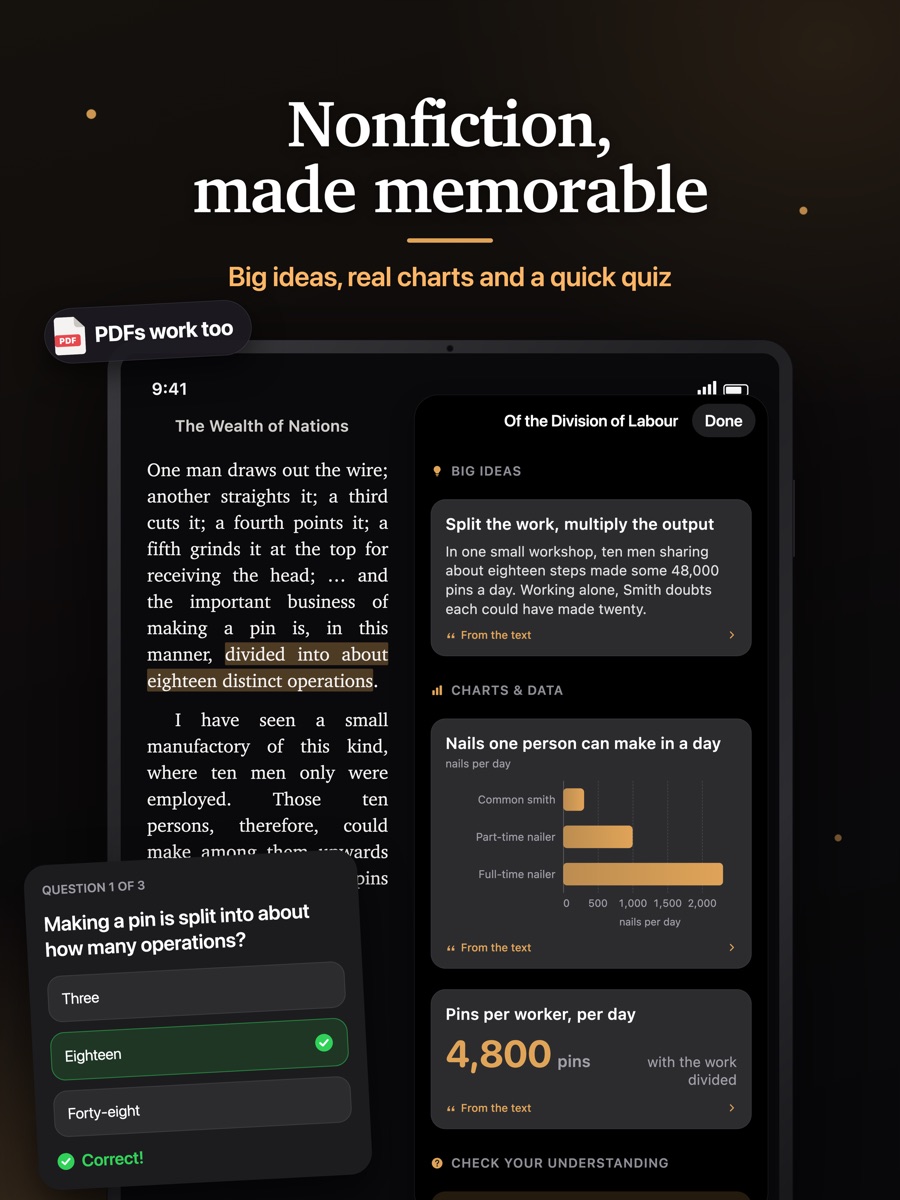
Open the Genie menu in any nonfiction chapter and choose Big Ideas & Charts. You get three to five cards, each with the idea in a line or two and the passage it's drawn from.
That passage matters. Before a card is shown, Book2Life checks that the quote really appears in the chapter, word for word. If it doesn't, the card is dropped. Tap Show in book and the reader turns to the page and highlights the sentence, so you can read the original in context.
Charts from the numbers on the page
When a chapter gives figures, such as wages in two trades, the population of a town, or a growth rate, Book2Life draws them as a real chart. It doesn't generate a picture of a chart. Tap one to see where the numbers came from.
Most chapters have no figures worth charting, and that's fine. You won't see a chart unless the text supplied the data.
A timeline for history and biography
History and biography chapters add their dated events to a running timeline for the book. Read on and the timeline fills in, and each entry links back to its chapter.
Three questions at the end
Quiz Me asks three multiple-choice questions about the chapter you just read. Each answer comes with a short explanation and the line it's based on. It's a quick check on whether you followed the argument or just turned the pages.
Ask the Book
Sometimes you want to ask the author something: what does this term mean, what's the evidence here, how does this connect to the last chapter. Ask the Book answers from the chapter you're reading, up to where you are, plus short notes from the chapters before it. Nothing past your page goes in, so it can't spoil what's ahead.
Answers quote the passages they lean on, and those quotes are tappable too. If the text doesn't cover your question, it says so instead of guessing. You can also select a passage and choose Ask to start a question about it.
It isn't only for nonfiction. In a novel you can ask who someone is, why a character did what they just did, or what an old-fashioned phrase means. It answers from the pages you've read and won't hint at what happens next, even for a book everyone already knows.
Ask the Book is part of Pro.
Key figures and concepts
Book Details for a nonfiction book has a Key Concepts & Figures section: the people, ideas, events and places the book keeps coming back to, each with a few lines on why it matters to the argument. It works like a cast list for a book that doesn't have a cast.
PDFs
Tap Bring your own book on the home screen and pick a PDF from Files. Book2Life turns it into a book with chapters, on your phone:
- If the PDF has bookmarks, those become the chapters.
- If it doesn't, Book2Life reads the headings: "Chapter 3", "Part II", "4. Results", "Appendix B" and so on. It ignores the table of contents and numbered lists inside the text.
- References, bibliographies, notes and the index become chapters of their own, so they stay out of the way of the main text.
- Page numbers, running headers, "Downloaded from…" stamps and similar leftovers are removed.
After that, a PDF is a book like any other. You get narration, highlights and notes, and if it's nonfiction, everything above. PDFs also count as nonfiction unless the book is clearly a novel, since that's what most of them are.
One limit for now: scanned PDFs with no text layer can't be imported, because there's no text to read.
What's free
Big ideas, charts and quizzes are free for one new chapter a day. Book2Life shares them between readers, so a chapter someone else has already opened loads free with no limit, and popular books are often fully covered. Pro raises the limit to a dozen new chapters a day and adds Ask the Book.
Try it
Start with something from the free catalog: On the Origin of Species, The Wealth of Nations, Walden or The Autobiography of Benjamin Franklin. Or bring a PDF you've been meaning to get through.
See your next book come to life
Read public-domain classics with AI illustrations, character art, and narration on Book2Life.